Common Lisp Development Tooling
Fair Warning: The short and sweet version is here: reference card. It gives you the mapping of the layers and relationships and lists every tool with links, 99% of the value with a few hundred percent less reading. The text below is a lengthy explanation as to why each layer exists.
The Fundamental Problem — Turtles All the Way Down
Code doesn’t exist in isolation. Every program depends on other programs (and those programs on other programs), and those dependencies have versions that change over time, sometimes in ways that break things. The entire history of development environments is an escalating series of attempts to manage this.
If you’re coming from languages like Python, JavaScript, or Rust, you’ll find that some layers map directly to tools you already know, and others will not and seem a bit alien.
Common Lisp’s development model is different in ways that matter.
In most modern languages, the solution looks roughly the same: install a compiler or interpreter, use a package manager to download libraries, and use an editor to write code. Common Lisp follows this general pattern but with important differences at nearly every layer.
The differences are rooted in the fact that Lisp predates the internet, predates the idea of casually downloading libraries from strangers, and was designed around an interactive development model.
Once you understand that Lisp is interactive at its core, it’s not just about editing files that get compiled, but a toolchain that allows for live introspection, and that “aliveness” has to be handled quite differently throughout the toolchain. Things start making sense.
Knowing what each layer does helps clarify which tool is needed, the choices of tools available for each layer start becoming easier to understand. You can more confidently reason about the tooling in the layer you are working in.
Understanding those differences is what (hopefully) separates a frustrating setup experience from a productive one.
The “Map”
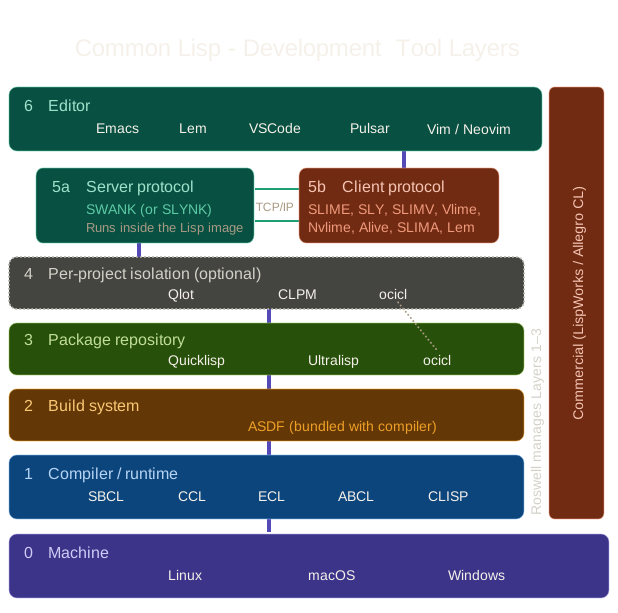
Here’s all six layers, what each layer is for, and which tools fit into that layer:
| Layer | Role | Tools |
|---|---|---|
| 6 | Editor | Emacs (via SLIME or SLY), Vim/Neovim (via SLIMV, Vlime, or Nvlime), VSCode (via Alive), Pulsar (via SLIMA), Lem (built-in) |
| 5a | Swank Wire Protocol (server) | SWANK (or SLYNK for SLY’s fork) |
| 5b | Swank Wire Protocol (client) | SLIME, SLY, SLIMV, Vlime, Nvlime, Alive, SLIMA, Lem (built-in) |
| 4 | Per-Project Isolation (optional) | Qlot (or CLPM, ocicl, vend) |
| 3 | Package Repository | Quicklisp (or ocicl, Ultralisp) |
| 2 | Build System | ASDF (bundled with your compiler) |
| 1 | Compiler/Runtime | SBCL (or CCL, ECL, ABCL, LispWorks, Allegro CL) |
| 0 | Machine | macOS / Linux / Windows |
What the experienced user sees: A single pipeline where each layer’s output feeds the next. They don’t think about the layers separately. They think “I cd into my project, start my editor, and I’m in a live environment with the right compiler version and the right libraries.”
What the newcomer sees: Six different layers with different tools and different configuration mechanisms, where a failure at any layer produces errors that seem to come from a different layer. “System not found” might mean ASDF can’t find it (Layer 2), Quicklisp hasn’t downloaded it (Layer 3), or Qlot isolation is hiding it (Layer 4). Debugging requires understanding which layer is responsible, which requires the mental model this essay is trying to build.
A map of these layers and their associated tools was oddly hard to find in one place, so I decided creating that map would be useful. The “Map” itself does a lot of the legwork, and if it’s already enough for you to fit the pieces together then you should head over to the Common Lisp Cookbook.
Note: I have not personally used even a fraction of all the tooling listed in this article, therefore recommend the Cookbook as an excellent resource of detailed “how to install” instructions from people who have.
Layer 0: Your Machine
This is your operating system and hardware. For Common Lisp development, the main things that matter are: your CPU architecture (which determines which compiler binaries work), your OS (which determines where tools install and how paths work), and whether you’re on a system where the default command-line tools are GNU-flavored (Linux) or BSD-flavored (macOS).
If you’re on Apple Silicon, Homebrew lives in /opt/homebrew/. If you’re on Intel Mac, it’s /usr/local/. If you’re on Linux with Homebrew, it typically lives under ~/.linuxbrew or /home/linuxbrew/.linuxbrew. If you’re on Arch Linux, most tools come from Pacman and land in /usr/bin.
If you’re on Windows, things are less standardized SBCL installs to Program Files, and if you’re using MSYS2 (recommended for rlwrap and other Unix-ish tools), its packages land in their own POSIX-style paths that don’t mix cleanly with native Windows paths. Knowing which world you’re in matters when something can’t be found. These details cascade through every subsequent layer.
Layer 1: The Compiler/Runtime — SBCL
What it is: SBCL (Steel Bank Common Lisp) is the most popular open-source Common Lisp compiler. It takes your Lisp source code and compiles it to native machine code. It also provides the REPL (Read-Eval-Print Loop), the interactive, running Lisp process you develop inside.
There are other open-source implementations (CCL, ECL, ABCL, CLISP), but SBCL has the best combination of performance, active maintenance, and ecosystem compatibility. Unless you have a specific reason to choose otherwise, start with SBCL.
Experienced users think of SBCL as their engine. Different versions may compile differently, optimize differently, or have different bugs.
For serious or collaborative projects you can pin the version so code behaves the same everywhere, but CL is far more stable across versions than Python or Node, so many people go a long way without worrying about this. Some also occasionally test against CCL to make sure their code is portable across implementations.
A note on commercial implementations: LispWorks and Allegro CL are commercial Common Lisp environments that bundle their own compiler, IDE, debugger, and build tools into a single integrated package. They effectively collapse the layers this essay describes into one product. They’re widely used in industry and offer capabilities (graphical IDE, profiler, support contracts) that the open-source toolchain doesn’t match out of the box.
They aren’t covered in detail here because this essay focuses on the free/open-source path most hobbyists and newcomers will take, but they’re worth knowing about, especially if you’re evaluating CL for professional use.
Note: The Boundaries Aren’t Quite What You Expect
In most languages, development is a one-way street: you write code, the compiler processes it, you get a result. The compiler is an external tool you invoke; you don’t get to participate in what it does.
In Common Lisp, that boundary dissolves.
Macros are functions that run at compile time. The compiler calls your code, your code hands back new code, and the compiler compiles that. You’re not just feeding the compiler input; you’re injecting your own logic into the compilation process itself. And because the system is live, you can redefine a macro while the system is running, and the next time anything using that macro is compiled, the compiler picks up your new version.
Combine this with the condition/restart system, where you can fix a broken function while the debugger is paused on the error it caused and resume execution from the point of failure, and you have a development loop where writing code, compiling code, running code, and fixing code are not separate steps.
They’re all happening in the same living process, interleaved however you want. Mainstream development environments don’t normally work this way.
Smalltalk has a similar live-image philosophy, and some Erlang/Elixir workflows share the hot-reloading spirit, but the combination of macros injecting logic into compilation, live redefinition, and the condition/restart system is distinctively Lisp.
Layer 2: The Build System — ASDF
What it is: ASDF (Another System Definition Facility) is Common Lisp’s build system. Every CL project has a .asd file that declares: here are my source files, load them in this order, and I depend on these other systems. It’s roughly equivalent to a package.json or Makefile, but for Lisp.
You (probably) don’t install this. ASDF comes bundled with SBCL (and every other modern CL implementation). If you’re using Roswell, it’s configured automatically. For most people, especially beginners, it’s infrastructure you use without thinking about.
However: The version of ASDF bundled with SBCL can lag behind the latest release. Advanced users sometimes upgrade ASDF independently to get newer features (e.g., uiop:define-package, better local nickname support). This is a “you’ll know when you need it” situation. If the bundled version works for you, leave it alone.
If you hit a limitation, ASDF’s repository has instructions for upgrading, or you can build SBCL from source with a newer ASDF pulled in. Even the build system that manages your dependencies has dependencies and versions that need managing. Turtles all the way down.
Most experienced users don’t think about ASDF much. They define a .asd file for their project, list dependencies and source files, and ASDF handles compilation ordering and loading. It’s just there.
Caveats: Watch out for the naming collision. There’s ASDF the Lisp build system (from 2001) and asdf-vm the runtime version manager (from 2014). They have nothing to do with each other. If you see “asdf” in a CL context, it means the build system. If you see it in a general dev-tools context, it means the version manager. This causes confusion constantly.
ASDF looks for .asd files in specific directories: the recommended default is ~/.local/share/common-lisp/source/ (the XDG-compliant path), with ~/common-lisp/ as a convenience shortcut (added in ASDF 3.1.2), plus whatever else is configured in its source registry. If Roswell is managing things, it adds ~/.roswell/local-projects/ to this list. Understanding where ASDF is looking is essential to understanding why “system not found” errors happen. The system file exists, but ASDF doesn’t know where to find it.
One thing that matters for later layers: ASDF’s default behavior is to make everything globally visible. Every project can see every other project’s systems. This becomes a problem when you want per-project isolation, which is what Layer 4 addresses.
Layer 3: The Package Repository
What it is: This layer handles downloading and managing libraries so you don’t have to do it manually. Several options exist.
Why it exists: Before Quicklisp (2010), installing a CL library meant manually downloading tarballs, putting them in the right directory, and hoping the dependencies worked out. Package repositories automated this and made CL much more accessible.
Quicklisp
The central repository of Common Lisp libraries. It’s a curated collection where the maintainer (Zach Beane) tests that all libraries build together in a given monthly release. When you say (ql:quickload :alexandria), Quicklisp downloads the Alexandria library and its dependencies, puts them somewhere ASDF can find them, and loads them into your running Lisp.
How it gets set up: If you’re using Roswell, Quicklisp is configured during ros setup. It lives inside ~/.roswell/. If you installed SBCL directly, you set up Quicklisp manually: download a Lisp file, load it into SBCL, run the installer, and add a line to your .sbclrc init file so it loads automatically on startup.
Caveats:
Everything is global by default. One shared location, one set of library versions visible to every project on your machine. This is fine for learning and small projects, but becomes a problem when Project A needs version X of a library and Project B needs version Y.
Quicklisp isn’t a separate external CLI like npm or cargo. It’s Lisp code that gets loaded into your running Lisp process. You invoke it from the REPL, and it modifies the running image’s state by making newly downloaded libraries available. The libraries themselves are still files on disk, but the package manager that fetches and loads them shares the same process as your application. This is quite different from how npm, pip, or cargo work.
Libraries in Quicklisp are updated monthly. If a bug was fixed upstream yesterday, you won’t get it until the next dist release.
Ultralisp
An alternative distribution that updates more frequently than Quicklisp and includes libraries not yet in mainline Quicklisp. You can add Ultralisp as an additional source alongside Quicklisp if you need fresher versions; it’s not a replacement, it’s a supplement.
ocicl
ocicl distributes packages as OCI-compliant artifacts from container registries, with sigstore verification. Despite the container-registry underpinning, the user experience is straightforward: you’re still just pulling tarballs of libraries, similar to Quicklisp. It’s modern, actively maintained, and well worth trying.
Notably, ocicl handles both package retrieval (this layer) and per-project isolation (Layer 4) in a single tool, so if you choose ocicl you may not need a separate isolation tool at all.
For most users, Quicklisp is simply where libraries come from. The monthly releases mean everything in a given dist has been tested together. You ql:quickload things you need and they just work.
Where this fits: Use Quicklisp directly: ql:quickload what you need and get on with it.
The global model works fine for learning, personal projects, and even much production work. If you later need per-project dependency isolation (Layer 4), tools like Qlot wrap Quicklisp to control which versions are visible to which project, but that’s optional and many lispers never need it.
Layer 4: Per-Project Isolation (optional)
What it is: This layer scopes your dependencies to individual projects rather than sharing them globally. Several tools fill this role, each with a different approach.
A word of calibration: If you’re coming from Python or Node, per-project isolation probably feels essential — you’ve been burned by dependency conflicts before. In CL, the situation is different.
Quicklisp’s monthly curated releases mean that the global set of libraries has already been tested together, and CL’s stability means version conflicts are much rarer.
Many experienced lispers work happily with a global Quicklisp install and ~/common-lisp/local-projects/ for their own code, only reaching for isolation tools when they actually need it (fast-moving libraries, reproducible CI builds, collaborative projects).
This layer is here when you need it, but don’t feel you must set it up on day one.
Qlot
The most widely adopted option. You create a qlfile in your project root listing what you need, run qlot install, and everything goes into a .qlot/ directory inside your project. When you run qlot exec sbcl (or qlot exec ros run), you get a Lisp that only sees the libraries installed for that project. It’s actively maintained, with regular commits, uses familiar patterns (qlfile/lockfile), and has the most community support when something goes wrong. It wraps Quicklisp rather than replacing it.
The workflow (mapped to familiar concepts):
| Qlot | Node.js equivalent | Purpose |
|---|---|---|
qlfile |
package.json |
Declares dependencies |
qlfile.lock |
package-lock.json |
Pins exact versions |
.qlot/ |
node_modules/ |
Contains installed libraries |
qlot exec sbcl |
npx (roughly) |
Runs in project-isolated context |
qlot install |
npm install |
Installs dependencies |
Both qlfile and qlfile.lock go into version control. .qlot/ gets gitignored.
ocicl
Already covered in Layer 3 — ocicl handles both package retrieval and per-project isolation in a single tool. If you’re using ocicl for your packages, you get isolation without needing a separate tool.
vend
vend takes a different approach entirely: instead of managing which library versions are visible to ASDF, it vendors your dependencies directly into your project tree. vend get clones dependency source code into a vendored/ directory, and vend repl constrains ASDF to only look within the current project. No Quicklisp, no lockfiles, no isolation configuration. It replaces both Layer 3 and Layer 4 in one move. The tradeoff is that your project now contains all its dependency source code (potentially hundreds of files), but the argument is simplicity: after vend get, a git clone of your project gives anyone everything they need to build it. Built on ECL, compiles to a ~400kb binary, and has documented integration with SLY, SLIME, Lem, and Slimv.
CLPM
Common Lisp Project Manager has the cleanest architecture. It separates the resolver from the runtime and communicates through environment variables so neither contaminates the Lisp image. It hasn’t been updated in a while, though in the CL world that doesn’t necessarily mean abandoned; CL projects can reach a stable equilibrium and remain perfectly functional without constant updates.
Caveats: Be aware that you’re fighting against Lisp’s nature here. ASDF’s default behavior is “everything is visible to everything.” Isolation tools work by restricting what ASDF can see, which means you’re adding a layer that works against the system’s natural grain.
Every time you start a REPL, you need to go through qlot exec (or equivalent) or your isolation breaks. The expert has internalized this; the newcomer will forget and get confused by libraries appearing or disappearing unexpectedly.
Also, your editor’s REPL connection (Layer 5) needs to start through the isolation tool for isolation to work. This adds a step to the “start developing” workflow.
Layer 5: The Swank Wire Protocol — Handling “Aliveness”
This is where Common Lisp diverges most from other languages.
Why it’s different: In Python, JavaScript, or Rust, development is file-based. You edit a file, save it, run the program. The program starts, does its thing, exits. Your editor provides syntax highlighting, maybe a linter, maybe a debugger you can attach. The cycle is edit, save, run, observe.
In Common Lisp, development is image-based. You start a Lisp process and it stays running. You load code into it, modify functions while it’s running, inspect live objects, and recover from errors without restarting. Your editor isn’t just a text editor with some nice features. It’s a real-time communication channel to a living process.
An experienced CL developer doesn’t “run” their program. They’re in a conversation with a running Lisp image. They evaluate a function definition, the image compiles it immediately. They call the function, see the result. They change the function, re-evaluate it, the running program now uses the new version. If something crashes, the debugger shows the live stack with inspectable values and they can choose how to recover, all without restarting anything.
This is the interactive restart/condition system that makes CL development so different.
When an error occurs, the Lisp doesn’t just crash with an error message. It pauses and presents you with the call stack, live variable bindings, and a set of restarts (predefined recovery strategies you can choose from). You can inspect any value, fix the broken function, and resume execution from the point of failure.
The protocol that makes this work: The interactive experience is powered by the Swank wire protocol, a client-server protocol that has been solving the editor-to-runtime communication problem since 2003, over a decade before Microsoft’s Language Server Protocol (LSP, ~2016) took a similar approach for the broader editor ecosystem.
The server side (SWANK, or its fork SLYNK) runs inside the Lisp image, exposing its internals: the debugger, the inspector, symbol completion from live state, macro expansion, and more. The server is usually started for you automatically when you launch a Lisp session through your editor’s integration, though some setups require manual configuration.
The client side is a plugin that runs inside your editor, connecting to the SWANK/SLYNK server and providing the user interface. Different editors have different clients: SLIME and SLY for Emacs, SLIMV for Vim, Vlime for Vim/Neovim (with Nvlime as a Neovim-specific modernized fork), Alive for VSCode, SLIMA for Pulsar. Lem, being written in Common Lisp, has the client built in natively.
The server and client are paired; you don’t mix and match. The client choice is determined by your editor choice, which is why the protocol and editor layers are tightly coupled even though they’re conceptually separate. You pick an editor (Layer 6), and the protocol client comes with it.
The Swank protocol is what makes CL development feel alive. The protocol is the invisible bridge.
Layer 6: The Editor
The editor choice matters more in Common Lisp than in any other ecosystem, because the editor is your interface to the live Lisp process through the Swank wire protocol (Layer 5).
The Editor Options
Emacs + SLIME — The Gold Standard
SLIME (Superior Lisp Interaction Mode for Emacs) is the original and most mature CL development environment. It provides:
- A REPL connected to the running Lisp image
- Compilation and evaluation of individual forms (not just whole files)
- The interactive debugger with stack inspection and restarts
- Jump to definition, documentation lookup, cross-referencing
- Symbol completion aware of the running image’s state
- Macro expansion, disassembly, profiling
Expert mental model: “SLIME is how I think in Lisp. The keybindings are muscle memory. C-c C-c compiles a function, C-c C-k compiles a file, M-. jumps to a definition, C-x C-e evaluates the form before my cursor. The debugger is always one error away.”
Caveats: Emacs has its own substantial learning curve. If you don’t already use Emacs, you’re learning two complex systems simultaneously — Emacs and Common Lisp — which is why many people bounce off CL before they ever get to write real code. The power of SLIME is undeniable, but the cost of entry is high.
Emacs + SLY — The Modern Fork
SLY is a fork of SLIME that modernizes several aspects: flex-style completion out of the box, “stickers” for live code annotation, more stable backreferences in the REPL, and cleaner internals that dropped Emacs 23 support in favor of modern Emacs features.
SLY users see it as SLIME’s core ideas with a refined implementation. Same workflow, some nice quality-of-life improvements.
Caveats: SLY and SLIME can’t run simultaneously in one Emacs. The community is somewhat split, with SLIME having more historical documentation and tutorials. SLY ships as the default in Doom Emacs; SLIME ships in Spacemacs. Importantly, SLY is not a strict superset of SLIME — some SLIME shortcuts don’t exist in SLY (notably C-c C-y / slime-call-defun, which saves significant typing), and C-c C-z (switch to REPL) behaves differently in ways that can trip up beginners. Some experienced lispers recommend SLIME for newcomers precisely because more existing tutorials and community answers assume SLIME’s behavior.
Vim/Neovim + Vlime, SLIMV, or Nvlime
For Vim and Neovim users, several plugins provide SLIME-like functionality. SLIMV is a Vim plugin (works in both Vim and Neovim). Vlime was designed for Vim 8’s channel APIs but also works in Neovim. Nvlime is a Neovim-specific fork of Vlime with a modernized UI using Neovim’s native features. They all ultimately talk to SWANK, giving you the same underlying capabilities — REPL, debugger, evaluation, jump-to-definition. Vlime’s architecture is slightly different from the Emacs clients: it runs its own intermediate server (written in Common Lisp) that wraps SWANK and translates between JSON and Swank commands, with a Vimscript client talking to that wrapper rather than to SWANK directly.
Vim users get most of what SLIME offers while staying in their preferred editor.
Caveats: The integration is not as deep as SLIME in Emacs. Emacs’s Lisp heritage means SLIME can do things that are naturally expressive in Elisp but awkward in Vimscript/Lua. The Neovim plugins have smaller communities, fewer contributors, and may lag behind on features or bug fixes. If you’re serious about CL development long-term, many Vim users eventually learn enough Emacs to use SLIME, or switch to a middle ground like Lem.
VSCode + Alive
Alive is a VSCode extension that provides CL development features: REPL, evaluation, debugger integration, and an LSP-based editing experience.
VSCode users can develop CL in the editor they already use for everything else.
Caveats: As of today, Alive is the least mature option in terms of depth of integration. The interactive debugging, condition system, and inspector are not yet as fully developed as SLIME/SLY. For someone already comfortable in VSCode who wants to try CL without changing editors, it’s a reasonable starting point, but for serious CL development it may feel limiting as your needs grow. The community around Alive is smaller than SLIME or SLY.
Lem — The CL-Native Editor
Lem is a general-purpose editor written in Common Lisp, with built-in SLIME-like CL development support. Its interface resembles Emacs (same keybindings), it speaks SWANK natively, and it supports other languages through its built-in LSP client.
Lem understands CL natively because it is CL. No configuration needed for Lisp development; it just works out of the box.
Caveats: Lem is less mature and has a smaller community than Emacs. Its plugin ecosystem is tiny by comparison. Lem does have git integration (including interactive rebases) and project management commands, though these are still experimental and less fully-featured than Emacs’s decades of packages. But for CL-focused development, Lem provides a more integrated experience with less setup.
The Terminal REPL (rlwrap sbcl)
If you’re not ready to commit to an editor, you can interact with SBCL directly from the terminal. Using rlwrap gives you readline support (history, line editing). This is the simplest possible setup.
Beyond bare rlwrap, there are more capable terminal REPLs worth knowing about: ICL is a feature-rich interactive REPL with code completion, multi-line editing, syntax highlighting, an inspector, jump to definition, a source code browser, and debugger integration, with installers for all three major platforms. It will even open an editor on your code for you. cl-repl provides similar niceties including a built-in debugger. Both are easy to install and make the terminal experience significantly better without requiring an editor commitment.
Caveats: ICL in particular closes much of the gap with editor-based setups. For other bare or lightly-enhanced REPLs, you lose interactive development features like the inspector and jump to definition. Either way, working without SWANK integration means you’re not getting the full two-way communication between editor and running image that defines the CL development experience.
Pulsar + SLIMA
Pulsar (the community continuation of Atom) has SLIMA, a package that provides deep integration with SLIME’s SWANK protocol. If you’re looking for a more modern editor feel than Emacs without the limitations of VSCode’s Alive, SLIMA is worth a look.
Caveats: Smaller community than any of the above options. Less documentation and fewer people to ask when things go wrong. But the SLIME integration is reportedly solid.
The Editor Tradeoff
This is the biggest tradeoff in the entire stack. The live interactive experience is what makes CL development so different from other languages, and it’s also what makes editor setup so much harder than “install an extension in VS Code.” You’re not just configuring syntax highlighting; you’re establishing a real-time communication channel with a running process.
If you can tolerate Emacs’s learning curve, use Emacs with SLIME or SLY. The depth of integration is hard to beat and you’ll be using the same tool as the majority of the CL community, which means every tutorial, every blog post, and every IRC answer assumes you’re in Emacs.
If you’re unsure just know that, SLIME has more community documentation and more predictable behavior for beginners; SLY has some nice modern touches but occasional behavioral differences that can confuse newcomers following SLIME-based tutorials.
If you can’t or won’t use Emacs, Lem is the most interesting alternative for CL-focused work, and Neovim with Vlime is a reasonable choice if you’re already invested in the Vim ecosystem.
Whatever you choose, don’t skip this layer. A bare terminal REPL without SWANK integration means you’re missing the core experience that justifies learning CL in the first place.
Why It’s This Complex (And Whether It Has To Be)
The layering in CL development environments isn’t arbitrary. It’s the accumulated result of decades of evolution. Each layer was added to solve a real problem that the previous layers didn’t handle:
- SBCL (and other implementations) exist because you need a compiler/runtime to execute Lisp code
- ASDF was added because manually ordering file loads is error-prone
- Quicklisp was added because manually downloading libraries is tedious
- Qlot/CLPM were added because global dependencies cause reproducibility failures
- The Swank wire protocol was added because developing Lisp through a bare REPL wastes the language’s interactive potential
- Editors were needed because code needs to live in files that persist beyond the running image, and the Swank protocol needs a client interface to be usable
The Docker approach routes around all this complexity by freezing a working state and handing it to you whole. Roswell reduces the friction by being a single entry point that configures multiple layers automatically. But underneath, the layers still exist because the problems they solve still exist.
Could it be simpler? In theory, yes. A tool that combined Roswell, Qlot, and SLIME setup into a single, opinionated workflow would eliminate most of the beginner friction. Lem comes closest to this vision on the editor side.
But the CL community is small, and the people who maintain these tools are volunteers solving their own problems. The “new user experience” work, as the Lisp-Stat author noted, is “the kind of work no one volunteers for, the kind you have to be paid for.”
The conceptual framework (the idea that a dev environment is layers stacked on each other and you need to understand which layer broke) is universal. But every specific tool, path, caveat, and configuration detail in this article is Common Lisp. A Racket or Scheme beginner would get value from the thinking approach but would need entirely different tool names at every layer.
Understanding the layers won’t make them disappear, but it will make them navigable. When something breaks, you’ll know which layer to look at. When someone recommends a tool, you’ll know which layer it operates on. When you eventually build something on top of this stack, you’ll know where your code meets the infrastructure and where the boundaries are.
Appendix:
Here are some install options to try: again it’s worth noting that the Common Lisp Cookbook is the better resource for detailed instructions.
Option A: Your OS package manager + Quicklisp + editor (the direct route)
On macOS: brew install sbcl. On Debian/Ubuntu: apt install sbcl. On Arch: pacman -S sbcl. On Windows: download the installer from sbcl.org (you’ll also want msys2 for rlwrap and libzstd). Install Quicklisp (a one-time, two-minute step — see Layer 3), enable the common-lisp module in Doom Emacs (which gives you SLY by default — you may also need to point Emacs at your SBCL executable and adjust REPL settings depending on your setup), and you have a working setup in under fifteen minutes.
Caveat: Your package manager’s SBCL may lag behind the latest release. For learning and most development this doesn’t matter. If you need a specific version or want to test across implementations, see the options below.
The direct route:
Your Machine
  └── SBCL (brew/apt/pacman)        ← Layer 1
       ├── ASDF (bundled)            ← Layer 2 (automatic)
       └── Quicklisp (manual setup)  ← Layer 3
            └── SWANK server         ← Layer 5 (server)
                 └── Doom Emacs + SLY   ← Layer 5 (client) + Layer 6 (editor)
A note on building from source: SBCL is mostly written in Lisp, which means you need an existing Common Lisp to compile it — you need a Lisp to build a Lisp. If you’re starting from nothing, you can bootstrap via CLISP (which can be compiled from just a C compiler) or download a prebuilt binary from sbcl.org and use it to compile a newer version. Building from source also gives you the SBCL source tree, which means you can M-. (jump to definition) into SBCL’s own internals from your editor — a real advantage when you want to understand what the compiler is doing.
Option B: The Docker Shortcut
It’s worth understanding where Docker-based approaches fit. Some projects in the CL community provide Docker images that bundle everything (SBCL, Quicklisp, SLIME, Emacs, and preconfigured libraries) into a single docker run command.
What this solves: It bypasses all of Layers 1-4 by freezing a known-good state into a container image. No version management, no build system configuration, no dependency resolution. Just a working snapshot of everything you need.
What it doesn’t solve: You’re developing inside a container, which means your files, your editor configuration, and your development experience are all mediated through Docker. You don’t learn how the layers work, which means you can’t debug them when the container doesn’t quite fit your needs. The isolation is also coarser than Qlot’s per-project model; you get one environment per container, not per project.
When it makes sense: For absolute beginners who want to write their first Lisp expression without spending a day on setup. For workshop or classroom environments. For CI/CD pipelines. For trying things out before committing to a local setup.
Try a ready-to-use containerized development environment here: Lisp-Stat
When it doesn’t: For serious, ongoing development. For projects that need specific library versions. For understanding what’s actually happening in your development environment. For the kind of work where you need the environment to be legible, both to yourself and to any agents or tools you collaborate with.
Option C: Your existing version manager (e.g., in my case mise)
If you already use mise for Node, Python, or other runtimes, there’s an SBCL plugin. You’d add sbcl 2.4.9 to your .tool-versions file and mise handles the rest. This gives you a consistent workflow across all your languages.
Caveat: The mise-sbcl plugin compiles SBCL from source, which is slow and can be fragile. In my experience on macOS (Apple Silicon), the plugin had to bootstrap via ECL because older SBCL binaries failed with mmap errors, and I needed zstd installed plus some environment variable wrangling — your mileage may vary depending on your platform and plugin version. It also only manages SBCL — if you ever want to test against CCL or ECL, you need a different tool.
Option D: Roswell (the CL-native option)
Roswell is a Common Lisp implementation manager, launcher, and development environment entry point. Where mise is a general-purpose version manager that happens to support SBCL via a plugin, Roswell is purpose-built for the CL ecosystem.
ros install sbcl-bin/2.4.9 downloads a prebuilt binary (no compilation from source). ros use sbcl-bin/2.4.9 switches your active implementation. ros run starts a REPL. Roswell manages all CL implementations uniformly (SBCL, CCL, ECL, CLISP) and can switch between them trivially.
But Roswell does more than just manage compiler versions. It also:
- Sets up Quicklisp (the package repository) automatically
- Configures ASDF (the build system) with sensible defaults
- Provides a standardized init file shared across implementations
- Installs CL tools and scripts (
ros install qlot) - Builds standalone executables from Lisp code
- Provides a scripting interface for writing command-line tools in CL
Everything lives under ~/.roswell/, which means one directory contains your implementations, configuration, Quicklisp libraries, and tools.
Roswell users see it as their single entry point to the CL ecosystem. Install Roswell once, and everything else comes through it.
The Roswell route:
Your Machine
  └── Roswell (ros)                  ← manages Layers 1–3
       ├── SBCL (binary)             ← Layer 1
       ├── ASDF (bundled)            ← Layer 2 (automatic)
       ├── Quicklisp (configured)    ← Layer 3 (automatic)
       └── Qlot (ros install qlot)   ← Layer 4
            └── qlot exec ros run
                 └── SWANK/SLYNK server         ← Layer 5 (server)
                      └── Emacs (SLIME/SLY),    ← Layer 5 (client) + Layer 6 (editor)
                          VSCode (Alive)
Other editors (Neovim/Vlime, Pulsar/SLIMA) speak SWANK and can work with Roswell, but their defaults assume bare sbcl — you’ll need to manually configure the server launch command to go through ros run or qlot exec.
Caveat: If something goes wrong with Roswell, the standard advice is “delete ~/.roswell and start over.” That’s simple but not surgical. You’re also dependent on Roswell’s maintainer (SANO Masatoshi / snmsts) continuing the prebuilt binary distribution. And using Roswell means you have one tool for most runtimes (mise) and a different tool for Lisp, which breaks uniformity.
Important scoping detail: Roswell’s Quicklisp installation is only visible through ros run, not through a bare sbcl command. This means if you start SBCL directly (without going through Roswell), you won’t see Quicklisp or any libraries installed through it. This also means your editor’s REPL plugin needs to be configured to launch through ros run, not just sbcl, or you’ll lose access to your libraries.
The tradeoff: Mise gives you consistency across your entire toolchain at the cost of a worse CL experience. Roswell gives you a better CL experience at the cost of having a separate tool for one language. That said, the CL community is not uniformly behind Roswell. Many experienced lispers manage just fine with a package-manager SBCL and manual Quicklisp setup, and consider Roswell an optional convenience rather than a necessity. If you’re seriously investing in CL development and want to manage multiple implementations or build executables, Roswell earns its keep. If you just want to write Lisp, Option A works.
March 10, 2026, revised March 22, 2026. Thanks to the Lisp community for the feedback that substantially improved the first drafts. Especially; Steven1799, @vindarel, halbert, atgreen, arthurno1, 964racer, stylewarning, digikar, ScottBurson, kchanqvq and rootnod3. All mistakes are mine but feel free to send bug reports and/or corrections